
What is velocity-based training?
Velocity-based training means using the speed of your reps to help make decisions about your training.
For example, in a squat, if you try to stand up as fast as you can, 60 kg will usually move faster than 140 kg. As the load gets heavier relative to how strong you are, the bar tends to move more slowly.
Now imagine you normally squat 120 kg at 0.40 metres per second (m/s), but today it’s moving at 0.46 m/s with similar technique and effort. That could be a sign you’re stronger or fresher than usual. The opposite could also be true if the bar is moving more slowly.
I say could because other things affect bar speed too. Technique, fatigue, how hard you try to accelerate, the device you’re using and plain old measurement noise all affect the result.
VBT gives us another metric to help us understand what’s happening in training, beyond just the weight we’re using.
Do you need velocity-based training to get stronger?
No. Plenty of people make excellent progress without ever measuring bar speed.
If you’re following a sensible program, getting stronger and using RPE or reps in reserve (RIR) well enough to choose your weights, there’s no urgent reason to buy another gadget (although who doesn’t love another gadget?).
VBT is more useful when you’ve already got the basics covered and want a little more information. For example, you might want to:
- Adjust weights on the day. See how today’s warm-up speed compares with your usual performance, rather than relying entirely on a max test from several weeks ago.
- Better estimate proximity to failure. For some exercises, telling the difference between RPE 8 and RPE 9 can be difficult. Last-rep velocity can give you a more accurate estimate.
- Track strength without maxing out. Use the relationship between load and speed to estimate your one-rep max and compare it with your RPE-based estimates.
- Check fatigue within a set. See how much your rep speed drops, which may help you decide when you’ve done enough reps for the intended session.
- Make better competition decisions. Compare warm-ups with previous training to help choose attempts.
- Learn more about your lifts. Work out whether different loads, variations and training blocks are producing the changes you’d expect.
You can use VBT alongside RPE, not just instead of it. Sometimes the VBT and RPE estimates disagree, and that’s worth investigating rather than assuming either one must be right.
How do you measure bar speed in the gym?
You need something that actually measures the movement. The VBT toolkit analyses your exported data; it doesn’t measure bar velocity on its own.
For most people looking for a bar speed tracker, there are two practical ways to get started:
- A phone-camera app, such as QWIK VBT (my favourite phone app option), estimates speed from video. It’s an accessible way to try VBT without needing a dedicated tether, but you have to record your lifts and load the videos into the app.
- A dedicated sensor, such as a linear position transducer (LPT) like RepOne Tether, uses a tether attached to the bar to measure its movement. It’s often quicker to get a reading between sets, especially when you’re tracking lots of reps or working in a busy gym.
I’ve used both, and you can find the links for them in the toolkit. If you’re only interested in your main lifts or a couple of top sets each week, the camera approach can be sufficient. If you want to track every warm-up and back-off set, the extra steps involved with filming add up, and a dedicated device might be worth it.
How do you get reliable velocity data?
- Keep the exercise consistent. Competition deadlifts and block pulls shouldn’t share one profile. The range of motion and movement are different.
- Use the same device and velocity metric. Swapping devices halfway through a comparison might change the data even if your strength hasn’t changed.
- Move with intent. Try to move the weight as quickly as you can with good technique. If you deliberately slow down or take your time with each rep, your bar speed won’t mean the same thing.
- Record a useful range of weights. A few reps all clustered around the same load won’t tell you much about the wider relationship.
- Pay attention to fatigue. For a load-velocity profile, you generally want reps that represent your relatively fresh performance at that weight. Reps late in a hard workout may be slower because you’re tired, not because you’ve suddenly got weaker.
- Keep your labels and notes consistent. Use the same names and tags for each lift, and note anything unusual. That makes it much easier to filter and compare the data later.
But none of this is particularly useful unless you actually do something with the data.
Which velocity metric should you use: first rep, last rep or velocity loss?
They’re useful for different things.
First-rep velocity can be used to create a load-velocity profile (like the free toolkit below does). This gives us an indication of what percentage of your 1RM a particular weight represents, based on how quickly you normally move it.
Last-rep velocity can be used to create an exertion-velocity profile (something I’m working on adding to the toolkit), which could help indicate how close to failure a set was, a bit like RPE.
Velocity loss is the percentage drop in speed from the first rep to the later reps. If the first rep is 0.50 m/s and the last is 0.40 m/s, that’s a 20% drop. It’s often used in strength and conditioning, especially with team-sport athletes. For the sort of strength training I coach, I generally find personalised load-velocity and exertion-velocity profiles more useful when there’s enough good data to build them.
How does a load-velocity profile work?
A load-velocity profile is just the relationship between how fast you tend to lift different weights in the same exercise.
Let’s use a hypothetical squat example. Imagine you’ve recorded the fastest suitable rep at a few loads, with the same velocity device and reasonably consistent technique.
| Squat weight | Rep velocity |
|---|---|
| 120 kg | 0.57 m/s |
| 130 kg | 0.49 m/s |
| 140 kg | 0.40 m/s |
| 155 kg | 0.26 m/s |
As the weight goes up, the velocity comes down.
If we plotted these on a graph, we’d get something close to a downward-sloping line. For example, 135 kg sits halfway between 130 and 140 kg, so between those two measurements we’d expect something around 0.45 m/s.
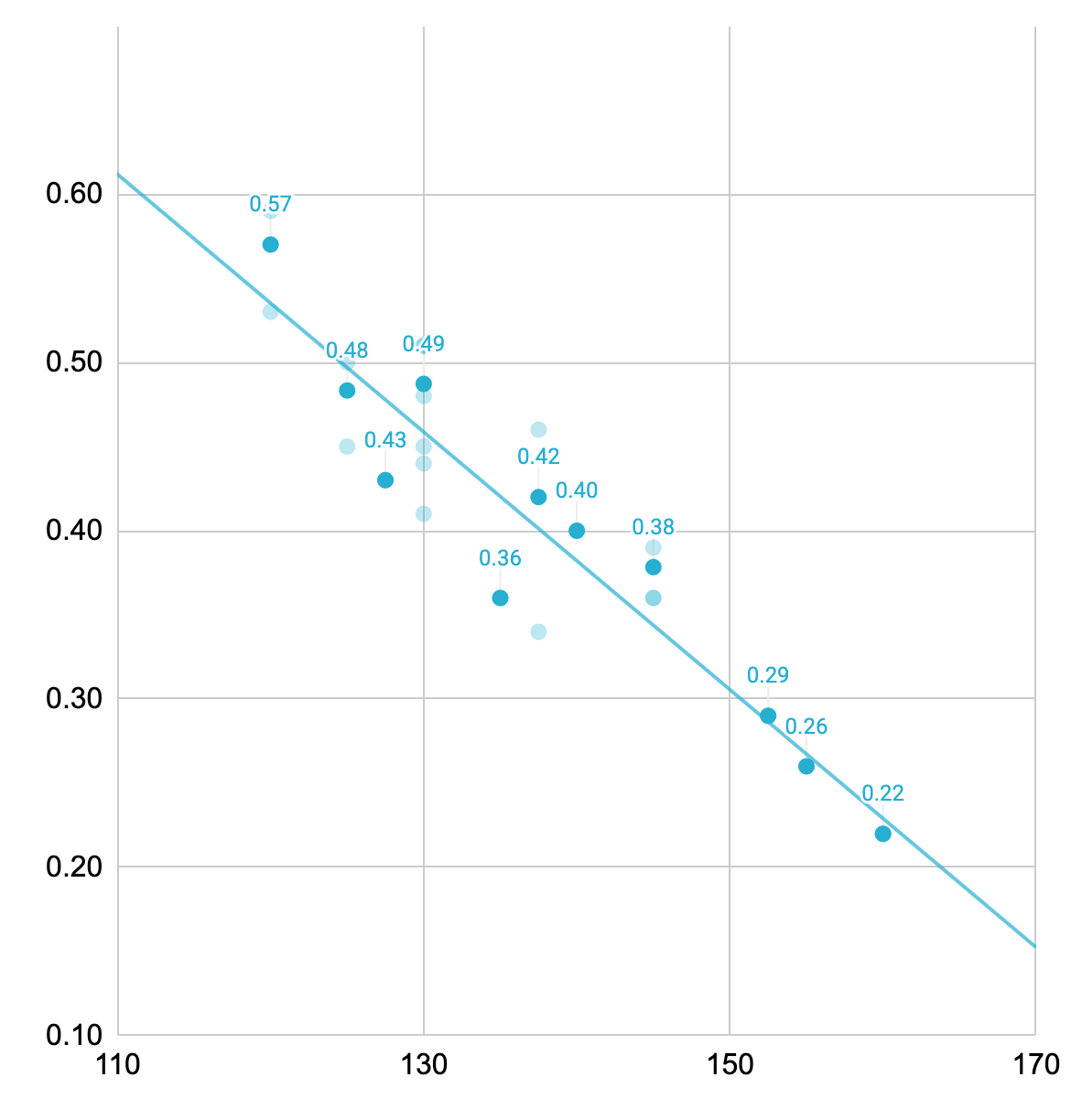
That’s not a magic velocity that everyone should hit at 135 kg. It’s an estimate based on this lifter’s numbers for this squat. Someone else’s 135 kg squat might be much faster or slower. As this lifter gets stronger, 135 kg will also move faster because it becomes a lower percentage of their 1RM.
With enough useful data across a good range of weights, we can fit a line to the relationship and use it to estimate what a given speed tells us about the load.
Can you estimate your 1RM from bar speed?
Yes, with some important caveats.
If you have enough data showing how your squat normally slows down as the load gets heavier, you can extend that relationship towards the speed at which you usually complete a maximal lift. That speed is often called the minimum velocity threshold (MVT). The velocity of your last rep in a set to failure is usually consistent with your MVT from a 1RM, so you can get this from something like a 5RM. I generally prefer a hard set of around 3–6 reps as a starting point.
The spreadsheet can use your data plus this MVT to produce an estimated 1RM (e1RM).
A load-velocity profile can overestimate your actual 1RM, so don’t assume the estimate is exactly what you could hit in a max test. What I find more useful is comparing the trend week to week, even when you’re using different weights or rep ranges.
If you want a useful e1RM estimate from the profile, try to include some heavier sets around 80–90% of your 1RM, not just lots of lighter work.
There’s a lot more detail and nuance to this, but rather than writing a whole textbook here, the main point is that the more consistent your setup and the more relevant the data, the more confidence you can have in the trend.
What’s the difference between first-rep and first-best-rep velocity?
The first rep is usually the fastest, but sometimes it isn’t. If you weren’t quite ready or didn’t accelerate properly, a later rep might be faster. In that case, I prefer to use the first best rep, meaning the earliest rep that reached the fastest speed in the set. That can give us a better indication of what you were capable of at that weight.
How do you build your first load-velocity profile?
You don’t have to test a genuine one-rep max.
Start with one lift, your usual setup and a sensible estimate of your current strength. Work through progressively heavier warm-ups and singles, recording bar speed as you go. Include several different loads, keep your technique consistent and allow enough rest that fatigue isn’t driving the whole relationship.
The VBT toolkit includes a guided testing protocol to collect the data for your first usable profile in a single session for each lift.
A hard but successful single can be useful towards the heavy end of the profile. There’s no need to miss a lift to get another data point. Use spotters and safeties where appropriate.
Keep adding suitable training data and the profile generator can incorporate it, so you have more evidence to work with over time.
You can also skip the dedicated testing session and just start recording your normal training. Once you’ve collected enough good data across different loads, you can build a useful profile from that.
How do you use bar speed to choose a training weight?
Let’s say your program calls for a top set at around 80% of your 1RM.
You could calculate that from a max you tested six weeks ago and just follow the number. Or you could look at how fast today’s warm-ups are moving and compare them with your established profile.
If a familiar warm-up is moving faster than your profile predicts, that may suggest the planned weight is a little lighter relative to your current capacity. If it’s moving slower, you might decide to be more conservative.
You can then use the profile to estimate which weight is likely to correspond to your intended percentage today, rather than blindly using the same percentage of an old max.
I’d still pay attention to how your warm-ups feel, whether the technique looks right and what the session is meant to achieve. One unusually fast rep doesn’t automatically justify adding 10 kg.
Can VBT help choose powerlifting competition attempts?
This is one of my favourite practical uses.
At a competition I coached, we compared an athlete’s warm-up speeds with the load-velocity profiles we’d built from her training. On squat, her later warm-ups were moving a little faster than expected, which gave us confidence that the planned attempts were comfortably within reach.
We didn’t immediately put the attempts up. She had a qualifying total to secure, and keeping the squat plan sensible left us more room to make decisions later in the competition.
Bench press was the opposite. One of the warm-ups was slightly slower than expected. After her opener, the athlete wasn’t sure which of two possible second attempts made more sense. The velocity data helped us lean towards the more conservative jump, which turned out to be the better choice on the day.
What if your velocity data looks wrong?
Before you conclude that you’ve suddenly got stronger or weaker, look at the actual reps.
I was building a profile for one of my clients and noticed a data point sitting way above the rest of the trend. When I checked the raw data, two reps had been recorded much faster than the reps immediately before and after them, even though they were part of the same set.
It didn’t really make sense that those two reps were genuinely so much faster. It was more likely that the device had made a measurement error.
The spreadsheet lets you inspect the processed data and manually flag reps that shouldn’t be used. Once I excluded those two outliers, the trend line fitted the rest of the athlete’s data much more sensibly.
That doesn’t mean you should delete everything that doesn’t fit the result you want! If a rep looks odd, go back and work out why. Sometimes it’s bad data. Sometimes it’s telling you something interesting about the lift.
Other easy mistakes are mixing paused and touch-and-go bench press, using a different velocity metric or trying to build a profile from only a tiny range of loads. That’s why consistent exercise names and tags make things much easier.
Most of the time, if the data has been recorded and labelled consistently, the spreadsheet’s automatic cleaning and processing will take care of the rest and give you a usable velocity profile.
Which free VBT calculator should you use?
I’ve made a Load-Velocity Profile Generator in Google Sheets so you don’t have to manually sort through CSV files, build graphs and fit models every time you want to use your velocity data. You just copy and paste the raw exports from one of the supported devices and it does the rest. If you use a different device, feel free to email me with its export format and I’ll see whether I can make a compatible version.
There are currently two versions of the profile generator:
- QWIK VBT: for the exported sets and reps data from the phone-camera app.
- RepOne Tether: for the data exported from the RepOne device.
The load-velocity profile tools are available now. I’ve also been working on an exertion-velocity profile linking last-rep speed with RPE, but I wouldn’t want you signing up expecting that extra tool to be included until it’s actually released.
Open the Google Drive folder and choose File → Make a copy for the version you need. Work in Google Sheets rather than Excel, which may not support every feature.
If you already have a QWIK or RepOne device and want to make better use of the data it produces, this should give you a useful starting point.