What does an estimated 1RM calculator tell you?
A one-rep max (1RM) is the most weight you can lift for one successful repetition of an exercise. The obvious way to find out what it is would be to keep adding weight until you can’t lift any more. But testing a true max takes time, creates fatigue and isn’t something most people need to do regularly.
An estimated one-rep max (e1RM) gives you an approximate number from a set you’ve already performed. Say you’ve just squatted 100 kg for five reps. Depending on how hard that set was, we can make a reasonable guess at what you might be capable of for one rep.
This is useful for two main things:
- Choosing training weights. You can estimate what weight might be suitable for a different number of reps, instead of guessing every time.
- Tracking your strength over time. You can compare estimates from different sets and rep ranges, even when you aren’t regularly testing heavy singles.
The important word here is estimate. Your e1RM is not a promise that you could lift that weight today, but it doesn’t need to be 100% accurate to be useful.
What numbers do you need to calculate your 1RM?
You need three things from a recent set:
- Weight: how much did you lift?
- Reps: how many did you complete?
- Reps in Reserve (RIR): how many more reps do you think you could have done before you reached failure?
If you did five reps but could probably have done another two, that’s 2 RIR.
A set of five at 0 RIR is roughly a five-rep max. A set of five at 2 RIR tells us that you could probably have done around seven reps if you’d kept going. The second set therefore represents a smaller percentage of your maximum, even though you lifted the same weight for the same reps.
The calculator uses a standardised reps-and-RIR model to estimate what percentage of your max that set represents. From there, the basic calculation is:
Estimated 1RM ≈ weight lifted ÷ estimated percentage of 1RM.
You can do this yourself using a suitable rep/RIR chart, or let the Google Sheet handle it.
Example: estimating a squat 1RM from five reps
Let’s say you squat 100 kg for 5 reps at 2 RIR, meaning you reckon you had two reps left.
That puts your set somewhere around the low-to-mid 80% range of your 1RM, depending on the model. For our example, we’ll use 82%.
100 kg ÷ 0.82 ≈ 122 kg estimated 1RM.
Does that mean you’d definitely squat 122 kg if you walked up to the bar right now? No. Maybe you could do 120 kg, maybe 125 kg. The estimate isn’t a prediction down to the last kg (or lb if you swing that way).
Imagine that a few weeks later you squat 105 kg for 3 reps at 3 RIR. Are you stronger or weaker than when you did 100 kg for 5 reps at 2 RIR? The calculator puts the newer set at around 124 kg e1RM. Assuming your technique and RIR ratings are reasonably consistent, that’s a good sign your strength is moving in the right direction.
You didn’t need to max out or do the exact same reps/RIR to be pretty sure that you are getting stronger.
How accurate is an estimated 1RM?
It depends on the exercise, how many reps you do, how accurately you judge RIR and how well the model represents you.
Some people are better at heavy singles but lose reps quickly as the weight gets lighter. Others aren’t so good at heavy singles but can crank out plenty of reps at a moderate percentage of their max. A single standardised calculation won’t describe everyone perfectly.
You’ll generally get more useful estimates when:
- you’re familiar with the exercise and your technique is reasonably consistent;
- the set is challenging enough that you can judge how many reps you had left;
- you’re not basing the estimate on a very high-rep set;
- you compare the same exercise, or the same variation, across time.
Sets of around 1–5 reps with a few reps in reserve can be useful. Very easy sets and sets of 20-plus reps tend to make the estimate less reliable, partly because judging RIR gets harder and people’s rep capacities differ more.
When should you be cautious about an estimated 1RM?
If you’re learning a lift, returning after time away, unusually fatigued or changing how you perform the exercise, don’t put too much weight on the number. The same applies if pain is changing your movement or you’re unsure of your RIR rating (I always find deadlifts hard to rate).
There’s also a difference between a change in your estimate on any given day and a change in your actual strength. If your squat estimate goes down this week, it might mean you’ve lost strength. Or you might just be tired, your technique might have changed, or you might have rated the set differently.
Look at the trend in your e1RM over a training block rather than treating every new calculation as proof that you’re getting stronger or weaker.
How can you use your estimated 1RM to choose training weights?
Let’s come back to our 122 kg estimated squat max. You could use it as a starting point for choosing the weight for a different rep target, or for checking whether the weights you’ve been using are still appropriate.
For example, say you start with a heavier set and want your subsequent sets to be at 80% of your e1RM for the day. Based on our example, that’s about 97.5 kg. The calculator does this for you, you can enter the set you used to estimate your 1RM, then tell the calculator what you want your next set to be and it will give you the weight.
This can help you work around day-to-day fluctuations in strength rather than always calculating that 80% from a max test you did at the start of your program.
What’s in the free estimated 1RM calculator?
I’ve put the calculations into a Google Sheet so you can make your own copy. If you already track your training in Google Sheets, you can also copy the calculator straight into your program spreadsheet.
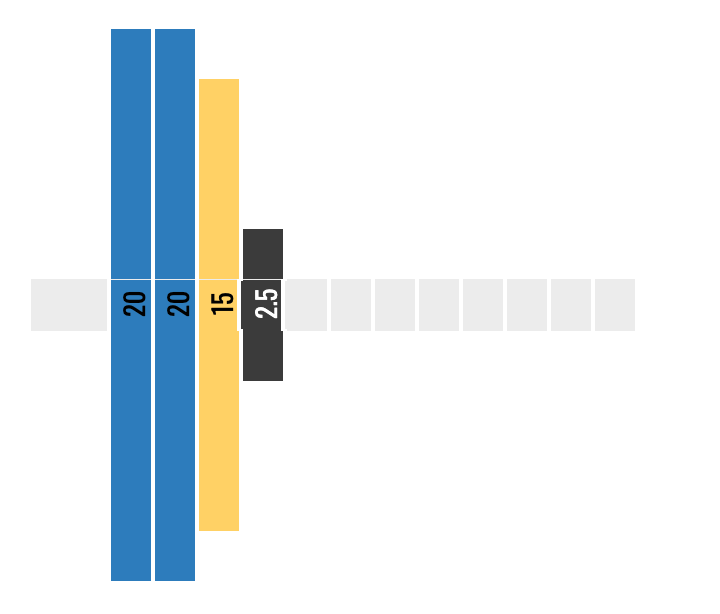
The calculator also generates an image showing which plates to put on the bar, so you don't even have to do the plate maths yourself.
Enter the weight, reps and RIR from your set and you'll get an estimated 1RM. You can also calculate weights for different rep targets. The same sheet includes warm-up planners if you want to use those later.
The sheet opens as view-only. Choose File → Make a copy to enter your own numbers, then use your copy in Google Sheets. Downloading it to Excel may not preserve all the features.